
 EN
EN



Core Compatibility Pillars: CPU Socket, RAM, and Certified Interoperability
Matching LGA 4677, LGA 1700, SP5, and SP6 Sockets to Enterprise CPUs
When choosing enterprise motherboards, getting the right CPU socket match is absolutely essential. Intel's LGA 4677 works specifically with their Xeon Scalable chips, whereas the LGA 1700 socket only fits those newer 13th and 14th generation Core desktop processors. On the AMD side things get interesting too. Their SP5 socket was built for the EPYC 9004 series, but if someone wants to go with a Threadripper PRO 7000, they need to look at the SP6 option instead. Getting this wrong means the processor simply won't fit into the board, and even if it somehow does, the system definitely won't boot up properly. Most major hardware manufacturers have detailed compatibility charts showing exactly which CPUs work with each motherboard model. These documents are worth checking thoroughly before making any purchase decisions since mixing incompatible components can lead to serious headaches down the road.
ECC DDR4/DDR5 Support, Dual-Channel Reliability, and Scalable Memory Capacity
In enterprise settings, ECC memory just can't be skipped if we want to stop those sneaky data errors that creep in during extended operations such as running virtual machines or complex financial models. The jump from DDR4 to DDR5 brings around 50% better bandwidth according to JEDEC standards released last year, while setting up dual channels really boosts what gets through the system. When it comes to databases and big data analysis, most servers now come with at least 128GB of RAM these days. Top tier hardware actually supports eight DIMM slots or even more, allowing companies to expand their memory using either RDIMMs or LRDIMMs depending on stability requirements and budget constraints.
BIOS Firmware Validation and Vendor-Certified Motherboard Compatibility
Just having the right socket doesn't cut it when building reliable systems. The real work happens at the BIOS level where hardware components actually talk to each other about power management, how memory modules get trained, and those complicated PCIe negotiations. For enterprise grade boards, manufacturers put them through their paces with over 500 hours of torture tests looking at things like whether voltages stay steady under load, if the system properly handles heat spikes, and if multiple DIMMs can coexist without fighting for bandwidth. Big names in the industry have developed their own certification programs too. Intel runs its Server Platform Validation program while AMD has EPYC Ready. These aren't just marketing buzzwords either. They're actual tests that check whether a particular CPU will work with certain memory sticks or expansion cards before anyone ever installs them in a server rack, which cuts down on headaches later on.
Intel vs AMD Enterprise Motherboard Ecosystems: Chipsets and Platform Lock-In
Intel C662/C621/C256 Chipsets and Motherboard Constraints for Xeon Scalable & W-3400
Intel's enterprise chipsets create pretty strict boundaries between platforms. Take the C662 for instance it works exclusively with LGA 4677 based Xeon Scalable processors paired with 8 channel DDR5 memory. Meanwhile the C256 models can't go beyond LGA 1700 sockets and are limited to W 3400 workstation chips. What does this mean practically? When someone wants to move up from a C621 platform to something with W 3400 capabilities, they often end up needing a completely new motherboard. Why? Because there have been significant changes in how voltage regulation modules work, power sequencing requirements, and the way PCIe lanes are laid out across these different architectures. And let's not forget about those sustained 300 watt thermal design power ratings which basically force manufacturers to implement at least 12 phase VRMs along with serious cooling systems. All of this creates what many in the industry call architectural lock in where Intel focuses more on ensuring compatibility and validation than offering real flexibility to system builders.
AMD WRX90/SP5 Platforms and Motherboard Requirements for EPYC 9004 and Ryzen Threadripper PRO
The WRX90 and SP5 platforms from AMD are all about looking ahead when it comes to compatibility. The SP5 socket works with today's EPYC 9004 processors as well as whatever comes next in the Zen 5 lineup. Meanwhile, WRX90 boards feature this new LGA 6096 connector specifically designed for the upcoming Ryzen Threadripper PRO 7000 series. For those building high-end systems, there are some important hardware requirements to consider. Most setups need at least 16+2 phase VRMs to handle the 350W thermal design power, plus support for ECC DDR5 memory is non-negotiable. AMD has another advantage over Intel here too. While Intel sticks with fixed lane allocations, AMD's approach allows PCIe 5.0 bifurcation, which means one motherboard can actually run up to 24 NVMe drives right out of the box without needing extra expansion cards. That said, there's a catch worth mentioning. The WRX90 chipset does generate enough heat that active cooling becomes necessary because of the constant around 15W power consumption just for I/O operations. But many builders see this as a fair exchange for getting so many peripherals packed into a single system.
Enterprise-Grade Motherboard Reliability: VRMs, Thermal Design, and 24/7 Uptime Engineering
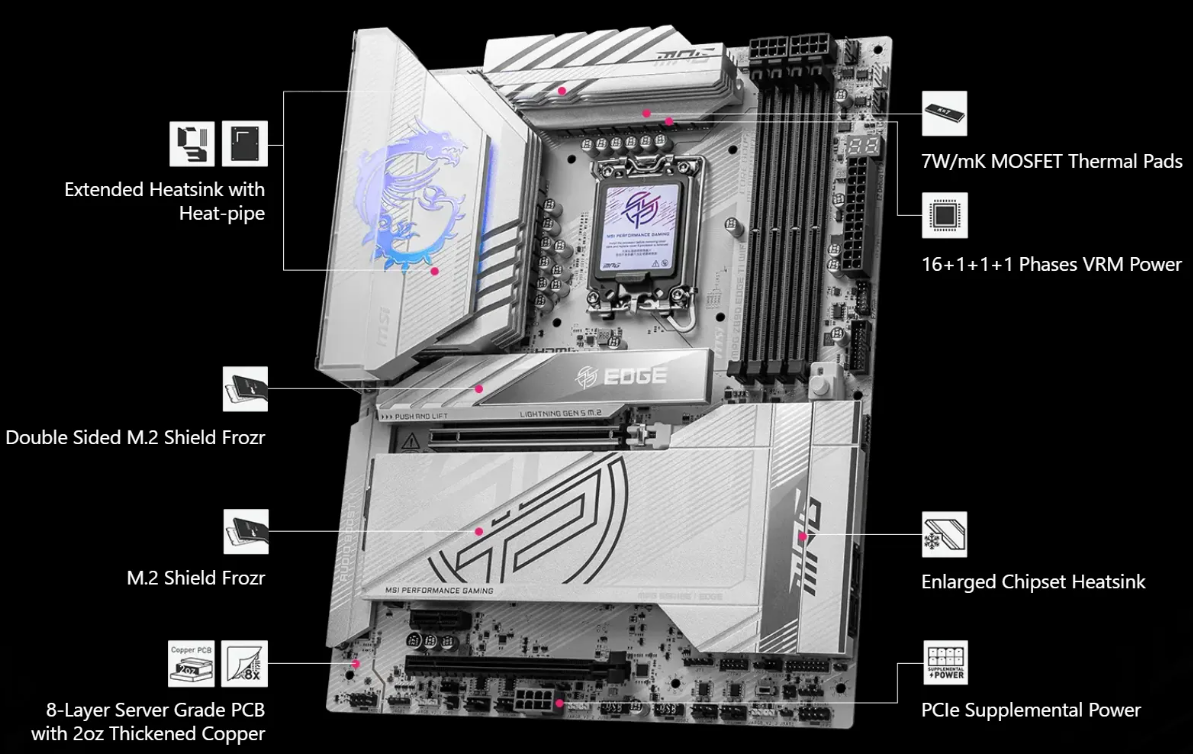
Enterprise grade motherboards aren't really about blasting out maximum performance all the time. They're built to keep running day after day without breaking a sweat. The VRM systems typically have at least eight phases these days, along with those tough alloy core chokes and capacitors rated for high temperatures. All this stuff works together to give the processor steady power even during long workloads, which helps prevent wear and tear on the chip itself. When it comes to staying cool, manufacturers slap on those thick multi layer heatsinks that touch the components directly. Some boards also feature those fancy server quality thermal pads with around 15W/mK conductivity rating. And don't forget about how the board is laid out to maximize airflow through the system. Before shipping, every component gets put through its paces with MIL-STD-810H tests and spends 2000 hours just sitting there running non stop. Why go through all this trouble? Because when servers crash unexpectedly, companies lose money fast. We're talking over seven hundred forty thousand dollars per hour according to a study from Ponemon Institute back in 2023. That's why redundancy matters so much in these designs.
Scalable I/O and Expansion: PCIe 5.0, M.2, SATA, and Mission-Critical Peripheral Support
PCIe Lane Allocation, M.2 Keying (M/B/E), and Hot-Swap SATA Controller Integration
Getting PCIe lanes right matters a lot when multiple components need access at once. When we talk about modern systems with multiple GPUs running alongside fast NVMe storage arrays and high speed network cards, proper lane management becomes absolutely essential. The latest PCIe 5.0 standard gives us twice the bandwidth of Gen4, hitting impressive speeds of 128GB/s on those x16 links. But all that extra power means motherboard designers have to be smart about how they spread out these lanes across different expansion slots and M.2 connectors. Speaking of M.2, the physical keying actually tells us what kind of device can go there. The M-key slot handles those blazing fast NVMe SSDs capable of pushing over 14,500MB/s, while B-key slots are for traditional SATA SSDs. And don't forget about the E-key slots which fit Wi-Fi 6E or even newer Wi-Fi 7 modules. For businesses where storage uptime is critical, many servers now come with built-in hot swap SATA controllers. These let technicians replace failing drives without powering down the entire system, something that keeps operations running smoothly in data centers and remote locations where downtime just isn't an option.
Table of Contents
- Core Compatibility Pillars: CPU Socket, RAM, and Certified Interoperability
- Intel vs AMD Enterprise Motherboard Ecosystems: Chipsets and Platform Lock-In
- Enterprise-Grade Motherboard Reliability: VRMs, Thermal Design, and 24/7 Uptime Engineering
- Scalable I/O and Expansion: PCIe 5.0, M.2, SATA, and Mission-Critical Peripheral Support