
 EN
EN



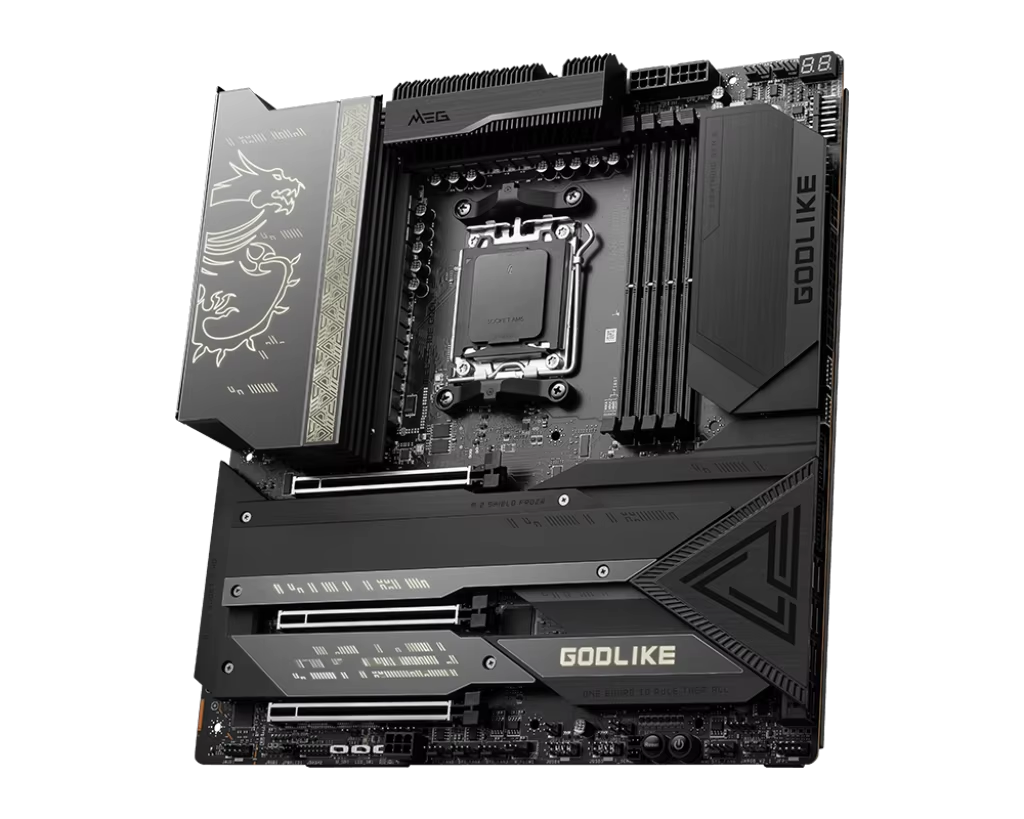
Prioritize PCIe Slot Flexibility for GPU and Expansion Card Upgrades
CPU vs. Chipset PCIe Lanes: Understanding Bandwidth Sources
When evaluating a motherboard, knowing the origin of each PCIe lane is essential for building a high-performance system. CPU-provided lanes deliver the lowest latency and highest bandwidth—typically reserved for the primary GPU slot and the fastest M.2 SSD. In contrast, chipset-provided lanes share a single DMI link back to the CPU, introducing potential bottlenecks when multiple bandwidth-intensive devices operate simultaneously. For example, mainstream Intel platforms commonly allocate 20 CPU lanes: 16 for the primary x16 GPU slot and four for a dedicated PCIe 5.0 or 4.0 M.2 slot. Additional slots—including secondary x16 expansion slots or extra M.2 connectors—draw from chipset lanes, limiting their peak throughput. Always consult the board’s block diagram to confirm which slots connect directly to the CPU; this ensures your GPU and primary NVMe drive receive full, unshared bandwidth.
Lane Sharing Scenarios: When x16 Becomes x8+x8 or x4+x4
Motherboard designers frequently share PCIe lanes to maximize slot count within hardware constraints—but this can silently degrade performance. Installing a second PCIe x16 card often forces the primary slot to drop from x16 to x8, splitting available CPU lanes equally. Similarly, populating certain M.2 slots may disable SATA ports or throttle a secondary PCIe slot to x4 speed. These trade-offs are clearly documented in the motherboard manual’s lane-sharing table. On some Z790 or X670E boards, for instance, using the second M.2 slot permanently reduces the last PCIe x16 slot to x4 mode. To avoid unexpected limitations—especially when planning multi-GPU setups or high-speed NVMe arrays—review the lane assignment diagram before purchase. This step ensures your expansion roadmap aligns with the motherboard’s actual capabilities.
Maximize Storage Expandability via M.2 and SATA Configuration
M.2 Count, Protocol Support (PCIe 5.0/4.0, SATA), and Thermal Limits
The number of M.2 slots sets a hard limit on how many high-speed SSDs you can install natively—but protocol support matters more than sheer quantity. Modern motherboards typically offer two to four M.2 slots, yet only select ones support PCIe 5.0 (up to 64 Gbps) or even PCIe 4.0 (32 Gbps); others may be limited to SATA III (6 Gbps), which offers no advantage over 2.5-inch SATA drives and is increasingly obsolete. At minimum, ensure at least one M.2 slot supports PCIe 5.0 if you plan to adopt next-generation Gen5 SSDs. Thermal management is equally critical: high-bandwidth NVMe drives generate substantial heat, and without adequate cooling, they throttle during sustained workloads. Boards with integrated heatsinks on PCIe 5.0 slots—and designs that promote airflow across those areas—deliver more consistent performance. Some premium models go further with thermal pads or even dedicated fan headers for M.2 cooling.
SATA Port Availability and Hidden Lane Conflicts with M.2 Slots
SATA ports remain relevant for mechanical HDDs, legacy SSDs, and optical drives—but their availability is often compromised by M.2 usage. Many motherboards route SATA controllers through shared chipset PCIe lanes, meaning enabling certain M.2 slots disables one or more SATA ports. This behavior is explicitly outlined in the manual’s lane-sharing documentation. To prevent functional gaps, calculate your actual SATA port count after accounting for all planned M.2 deployments. If your workflow relies on multiple HDDs or SATA SSDs, prioritize boards that retain full SATA functionality—even with all M.2 slots occupied. Higher-end models sometimes integrate supplemental SATA controllers to bypass lane sharing entirely. As with PCIe planning, verify the lane diagram early: it’s the only reliable way to confirm compatibility between your storage strategy and the motherboard’s architecture.
Verify I/O and Internal Header Capacity for Peripheral Growth
A motherboard’s rear I/O panel and internal header count define its real-world peripheral scalability—without requiring dongles, hubs, or add-in cards. Start with the USB rear-panel layout: both quantity and generation matter. USB 3.2 Gen 2×2 (20 Gbps) is ideal for fast external SSDs and high-resolution capture devices, while USB 3.2 Gen 2 (10 Gbps) suffices for most peripherals. Internally, check the number and type of headers—USB 2.0, USB 3.2 Gen 1, front-panel audio, and especially fan/PWM headers. At least three to four fan headers are recommended for balanced case airflow and component cooling; boards with five or more offer greater flexibility for complex builds. If you use addressable RGB lighting, confirm the presence of at least one ARGB header (often labeled “ADD_HEADER” or “ADDR_LED”). Many enthusiast boards also include a dedicated AIO pump header with higher current capacity (up to 3A). Plan for one or two spare headers beyond your immediate needs—this buffer prevents costly mid-build compromises when adding new case fans, controllers, or sensors later.
Align Chipset and VRM Quality with Long-Term Motherboard Expandability Needs
Chipset Comparison: Entry-Level vs. Enthusiast Expansion Features
The chipset governs the motherboard’s expansion ceiling—dictating PCIe lane count, M.2 configuration flexibility, USB bandwidth, and connectivity options. Entry-level chipsets like Intel B760 or AMD B650 offer basic functionality but impose tight constraints: limited chipset PCIe lanes (often just 4–8), fewer native M.2 slots, and reduced USB 3.2 Gen 2×2 support. Enthusiast chipsets—including Intel Z790 and AMD X670E—unlock up to 20 chipset PCIe lanes, multiple independent M.2 slots (with no forced sharing), and broader support for PCIe 5.0, Thunderbolt™ (via add-in), and high-speed USB. This architectural headroom enables future upgrades like dual NVMe RAID arrays, 10 GbE networking, or professional video capture cards—without sacrificing existing device performance. Choosing an enthusiast chipset isn’t about today’s needs alone; it’s about preserving upgrade paths for 3–5 years without replacing the motherboard.
VRM Design and Cooling: Ensuring Stable Power Under Multi-Device Loads
A robust voltage regulator module (VRM) is foundational to long-term expandability—especially when powering a high-end CPU alongside multiple GPUs, NVMe drives, and high-power peripherals. VRM quality hinges on three factors: phase count, power stage rating (e.g., DrMOS vs. traditional MOSFETs), and thermal design. More phases distribute electrical load evenly, lowering ripple and improving efficiency; premium boards often use 12+ phases for high-TDP CPUs. Equally important is cooling: thick aluminum heatsinks with heat pipes—or even active fan-assisted solutions—prevent thermal throttling under sustained multi-device loads. A poorly cooled VRM may trigger CPU downclocking when adding a second GPU or running intensive storage workloads. For systems designed to scale, prioritize motherboards with verified 12+ phase VRMs and substantial heatsink coverage. This investment ensures stable, silent operation and extends motherboard longevity as your component ecosystem grows.
Frequently Asked Questions
What are CPU-provided PCIe lanes and why are they important?
CPU-provided PCIe lanes offer the lowest latency and highest bandwidth, making them ideal for the primary GPU slot and high-speed M.2 SSDs.
How do shared PCIe lanes affect performance?
Shared PCIe lanes can reduce performance by splitting bandwidth, especially when you install multiple devices like GPUs or M.2 SSDs.
What should I look for in M.2 slot configurations?
Ensure the motherboard supports PCIe 5.0 or 4.0 for M.2 slots, and verify if disabling certain SATA ports occurs when using specific M.2 slots.
Why is chipset quality critical for future expandability?
High-end chipsets like Intel Z790 or AMD X670E provide more PCIe lanes, USB bandwidth, and support for advanced technologies for upgrades.
What role does VRM design play in system stability?
VRM quality ensures stable power delivery and prevents throttling, especially when running high-power CPUs and multiple devices.