
 EN
EN



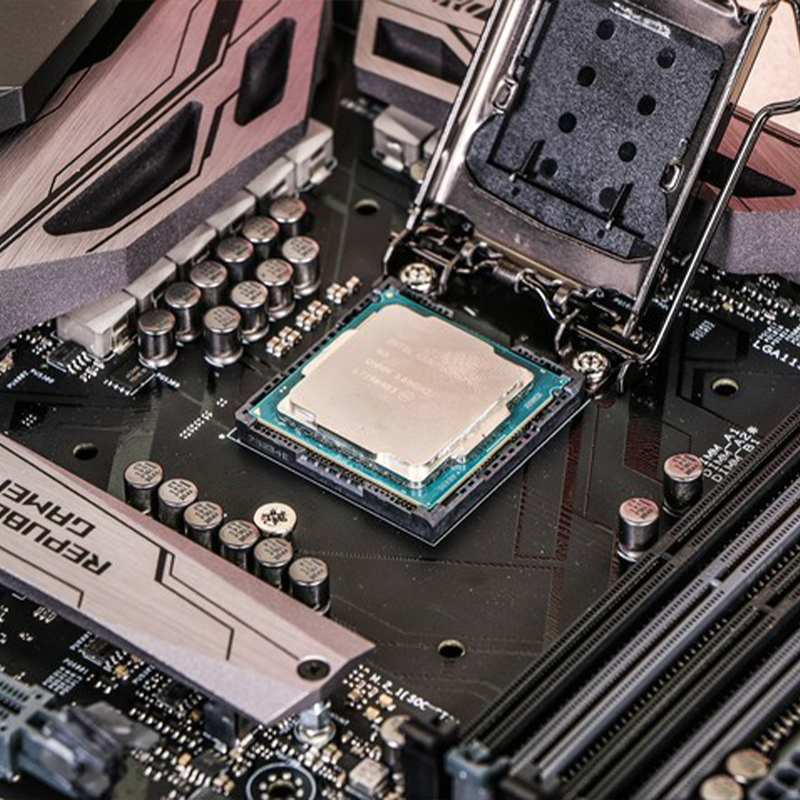
Understanding CPU and Motherboard Compatibility
The Importance of Compatibility Between CPU and Motherboard
A mismatched CPU and motherboard can render a system inoperable, wasting $200–$500+ on incompatible components (TechInsights 2023). Proper pairing ensures optimal performance, stability, and access to advanced features like PCIe 4.0 support. For example, pairing a modern CPU with an older chipset may disable USB-C or overclocking capabilities.
Socket Type Matching for Seamless Integration
All CPUs require a specific physical socket on the motherboard. Leading manufacturers use distinct designs:
| Socket Type | Common Generations | Key Features |
|---|---|---|
| Intel LGA | 12th–14th Gen Core | DDR5 support, PCIe 5.0 lanes |
| AMD AM5 | Ryzen 7000+ | Lower thermals, backward-cooler compatibility |
Installing a CPU into an incompatible socket risks bent pins or permanent hardware damage. Always verify socket specifications—such as LGA 1700 for Intel Raptor Lake CPUs—before purchasing.
How CPU Generation and Series Support Affect Motherboard Choice
Motherboards built for 13th generation Intel processors might need a BIOS update if someone wants to upgrade to the newer 14th gen chips. Things get even trickier with AMD's AM4 platform since not all boards work well together. Those budget friendly A520 chipsets typically can't handle those powerful 16 core Ryzen 9 models. Before making any hardware purchases, it's wise to look at what manufacturers list as compatible combinations through their Qualified Vendor Lists. This helps avoid headaches later when trying to get everything working properly without unexpected firmware issues popping up.
Common Pitfalls in CPU and Motherboard Compatibility
- BIOS Incompatibility: New CPUs may not boot on older motherboards without firmware updates
- Power Delivery Limits: Budget boards often can’t sustain high-end processors under load
- Feature Lockouts: Using a Core i9 on H610 chipsets disables memory overclocking
- Cooler Conflicts: Large CPU coolers may obstruct VRM heatsinks or RAM slots
Always cross-reference TDP (Thermal Design Power) ratings and physical clearances to avoid thermal throttling or installation issues.
Selecting the Right CPU Based on Performance Needs
Evaluating Core Count, Clock Speed, and Cache for Your Workload
Today's computer processors need to strike a balance between several key specs. First there's the number of cores, which lets them handle multiple tasks at once. For example, those fancy 16-core processors can speed up 3D rendering work by around 70%. Then we have clock speed measured in gigahertz that affects how fast they run individual tasks. And finally, cache size ranging from about 16MB to 128MB determines how quickly data gets accessed. When it comes to productivity stuff like editing videos, having more cores really makes a difference. According to PCMag last year, switching from a four core processor to an eight core one cuts down 4K video export time by roughly 40%. On the flip side, games tend to perform better when the clock speed goes over 4.5GHz since most game developers still design their software to work best with single thread processing power.
Intel vs AMD: Which Platform Suits Your Use Case?
When it comes to single threaded performance, Intel still holds an edge which makes them great for gaming and older applications that don't take advantage of multiple cores. On the other hand, AMD has really stepped up their game when handling multiple threads at once, something content creators and live streamers will appreciate. Looking at current AMD chips, they generally perform about 15 to maybe even 20 percent better on productivity workloads thanks to how well they scale across those extra cores. For gamers chasing every last frame per second, Intel's higher IPC numbers can make a difference, though there is another consideration worth mentioning. Platform compatibility tends to favor AMD in the long run since most of their socket designs stay relevant through several generations of CPUs. Intel users usually end up needing entirely new motherboards whenever there's a significant CPU upgrade cycle.
Balancing Power Efficiency and Thermal Design Power (TDP)
The TDP rating of a CPU basically tells us what kind of cooling system we need and how much electricity it will eat up. For smaller setups or machines that run non-stop like office computers or network storage boxes, low TDP models ranging from around 35 to 65 watts work best. When dealing with high TDP processors over 105 watts though, good quality fans or even liquid cooling becomes necessary. Looking at workstation grade CPUs specifically, those with about 95 watt TDP ratings actually use roughly 33 percent less power when working hard compared to their 125 watt counterparts according to some tests done last year. So if someone is building something that needs to handle long tasks without overheating, going for efficient options makes sense. But folks who want to push hardware limits through overclocking should definitely leave extra space for heat dissipation in their builds.
Choosing a Motherboard That Matches Your CPU and Future Goals
Matching Chipset and Socket Compatibility With Your CPU
When picking out a motherboard, the first thing to check is whether it fits the CPU socket. Intel chips need LGA sockets such as the LGA 1851 for those new 15th Gen Core processors, whereas AMD sticks with their AM5 or older AM4 designs. Getting this wrong means the CPU won't even fit, which can lead to some seriously expensive mistakes down the road. Socket compatibility goes hand in hand with choosing the right chipset too. For example, Intel's Z890 and AMD's X870E chipsets open up possibilities for overclocking and support for faster PCIe 5.0 speeds. The B series boards are generally cheaper options but come with fewer fancy features. Most tech sites including Digital Trends recommend double checking the CPU spec sheet against what the motherboard offers before making any purchases. This simple step saves headaches later on.
Key Features to Consider: RAM Support, PCIe Lanes, M.2 Slots
Modern motherboards differentiate through expansion:
- DDR5-6400+ support (vs. DDR4-3200) benefits bandwidth-heavy applications
- PCIe 5.0 x16 slots deliver 128 GB/s bandwidth for next-gen GPUs and storage
- Dual M.2 Gen5 slots enable 14,000 MB/s NVMe SSDs
Budget models often limit these features, constraining future upgrades. Boards with four M.2 slots remain relevant 37% longer in gaming and workstation setups, according to FutureStartup’s 2025 PC building guide.
Future-Proofing Through Expandability and Upgrade Paths
The AM5 platform from AMD is backed for support until around 2026, which gives users pretty good options when it comes to upgrading their systems down the road. By contrast, Intel tends to replace socket types roughly every other generation, something that can end up costing consumers more money over time. When shopping for boards, look out for models featuring empty PCIe slots ready for expansion cards later on. Also worth considering are boards with BIOS Flashback functionality so people can install new CPUs even without having a graphics card installed yet. Networking capabilities matter too these days, so going for at least 2.5 Gb Ethernet connections plus Wi-Fi 7 makes sense for most builds. And don't forget about those VRM designs either – boards with high quality power delivery systems (think 16 or more phases) will keep things running smoothly when pushing newer processors hard under load conditions, avoiding annoying performance drops due to thermal throttling issues.
Platform Comparison: Intel vs AMD Ecosystems
Intel LGA Sockets and Chipset Evolution
The LGA sockets from Intel have gone through no fewer than twelve different versions since they first appeared back in 2004. The latest incarnation, LGA 1851, works with Arrow Lake chips right now. Intel tends to focus on getting better performance out of single threads while keeping things cool, but there's a catch here. Most of their platforms don't play nice with older components, so when someone wants to upgrade their processor, they usually need an entirely new motherboard too. Take the recent Z790 chipset for instance. It brought some nice features like DDR5 memory support and PCIe 5.0 speeds, yet users still face pretty limited options if they want to keep upgrading without breaking the bank on fresh hardware every few years. And let's not forget that most boards based on LGA 1851 will probably work with just one generation of CPUs before becoming obsolete, which definitely affects how much bang consumers get for their buck over time.
AMD AM5 and AM4 Ecosystems: Longevity and Upgrade Flexibility
AMD's AM4 platform actually lasted for five different CPU generations across seven long years, which was pretty impressive when it comes to how long sockets usually last. Now we have the new AM5 socket that works with the upcoming Ryzen 7000 and 9000 series chips. It supports the latest DDR5 memory and PCIe 5.0 technology too. Most importantly, AMD claims these boards should stay relevant until around 2026 at minimum. What makes this design so good is that people can upgrade their CPUs without having to throw away their entire motherboard, saving them money in the long run. Another big plus point for AM5 motherboards is they offer more PCIe lanes compared to what Intel provides on similar priced boards. While Intel manages about 20 lanes on mid range models, AM5 gives users access to 28 lanes total. This extra bandwidth really helps when someone wants to install multiple graphics cards or hook up several fast NVMe storage drives.
BIOS Updates and Their Role in Supporting New CPUs
The firmware on motherboards plays a big role in what CPUs will work with them. AMD keeps updating its AGESA software pretty frequently, which means newer Ryzen chips can often run on older AM5 boards after a simple BIOS flash. Take the 2023 update that brought support for those Ryzen 7000X3D models as an example. Things look different for Intel users though. They depend heavily on microcode patches from individual manufacturers, and most boards just can't handle more than one CPU generation because of their VRM designs. A recent Socket Longevity Report from 2024 shows this gap clearly: around 8 out of 10 AM5 boards last through two CPU generations while only about 3 in 10 Intel LGA 1851 boards manage the same feat.
Cost-Benefit Analysis of Intel vs AMD Platforms
When building mid-range systems, Intel hardware usually comes in around 15 to 20 percent cheaper at first glance, though it doesn't hold up so well over time. The AM5 motherboards from AMD do cost about $30 to $50 extra compared to similar Intel boards, but most people find they save money in the long run since there's no need to spend another $150 to $300 on new motherboards when upgrading processors later on. Looking at productivity tasks, Ryzen chips have more cores available these days, going all the way up to 16 versus Intel's maximum of 14. This makes a noticeable difference in things like video editing or 3D rendering where software can take advantage of those extra cores, often resulting in render times that are roughly 18 to 23 percent quicker according to tests with Blender. Gamers who want every last bit of performance might still lean toward Intel because of their higher clock speeds, but interestingly enough, some AMD models with that fancy 3D V-Cache tech actually perform better in 1080p gaming scenarios by around 9 to 14 percent as reported by TechSpot back in 2024.