
 EN


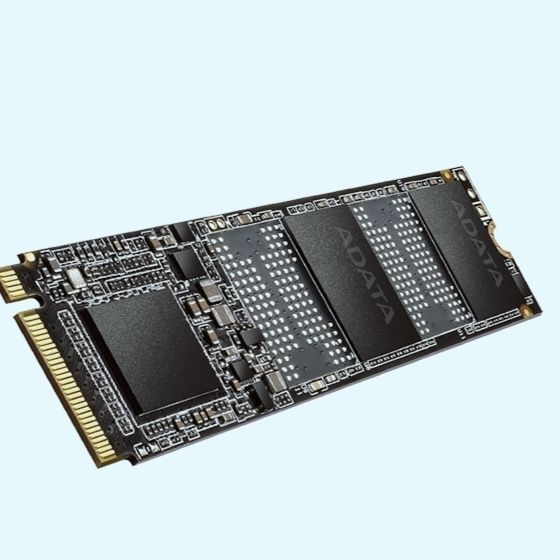
Key SSD Performance Metrics for Office Multitasking
For a multi-task office PC, not all SSD speed figures carry equal weight. The two metrics below predict everyday responsiveness better than peak sequential read/write claims.
Why 4K Random Read/Write Speeds Matter More Than Sequential Throughput
Office multitasking rarely moves large files. Instead, the OS, Office apps, and browser issue many small 4 KB requests across scattered locations. Storage workload analyses show 4K random reads and writes account for over 70% of I/O in typical office use—while sequential transfers stay below 10%. A high sequential rate of 7,000 MB/s matters little if the drive stumbles on dozens of tiny requests. Each open application, email search, or tab switch triggers a burst of 4K operations, measured in input/output operations per second (IOPS). At queue depth 1 (QD1)—where most user interactions happen—a capable NVMe SSD delivers 70–90 MB/s for 4K random reads; a typical SATA SSD manages just 30–40 MB/s. Drives with stronger 4K random performance deliver faster app switching, quicker file previews, and lower input lag. A high sequential score cannot compensate for weak 4K random performance—leading to a system that benchmarks well but feels sluggish during real work. Prioritize 4K random read/write IOPS and low latency over headline sequential throughput.
Real-World IOPS Benchmarks: Windows 11 + Office 365 + 15-Tab Chrome Workload
To mirror a busy office desktop, testers run Windows 11, Office 365, and fifteen active Chrome tabs. This workload creates a mix of 4K reads, writes, and background sync tasks. In third-party benchmark studies, a mainstream PCIe 4.0 NVMe SSD with DRAM cache typically sustains 60,000–90,000 random read IOPS and 40,000–70,000 random write IOPS at queue depth 32. But real-world responsiveness depends more on low queue depth behavior: under this workload, queue depth rarely exceeds 4. So QD1 and QD4 4K results matter most. A capable office SSD delivers around 15,000–25,000 IOPS at QD1 and 35,000–50,000 IOPS at QD4. Budget DRAM-less drives often fall to half those figures during mixed writes and browser cache updates—manifesting as delayed window switching, longer file open times, and brief freezes under load. For multi-task office PCs, prioritize SSDs that maintain stable IOPS in QD1–QD4 mixed tests—not peak sequential numbers.
Top SSD Types for Reliable Office Productivity
NVMe PCIe 4.0 SSDs with DRAM Cache: Optimal Balance of Speed and Value
NVMe PCIe 4.0 SSDs with DRAM cache offer the best balance of speed and value for multi-task office PCs. The DRAM buffer stores address-mapping tables, eliminating slow flash lookups for small-block requests. This is critical when modern operating systems, office suites, and multi-tab browsers generate mixed 4K random workloads. Application switching and file opens remain responsive under sustained load. Because office multitasking relies far more on consistent random read/write performance than sequential throughput, DRAM-equipped PCIe 4.0 drives maintain steady command latency from light to heavy queue depths. DRAM-less designs often show greater latency variation under identical conditions. Current pricing for PCIe 4.0 DRAM-cache SSDs has converged closely with older Gen3 options—making them a practical default for standard office builds. A 500 GB or 1 TB model with DRAM cache is a strong baseline choice for responsive multitasking without premium cost.
High-Endurance SATA III SSDs: A Cost-Effective Choice for Legacy Systems
High-endurance SATA III SSDs are a cost-effective choice for legacy office systems—especially those limited to 2.5-inch bays or M.2 SATA slots. While SATA III caps sequential bandwidth, many older CPUs and chipsets lack native NVMe support. These SSDs still deliver smooth responsiveness for modern OSes, office applications, and multiple browser tabs. Endurance—not top speed—is the defining metric here. Choose a model rated for at least 150 TBW (terabytes written), which comfortably covers three or more years of daily document saves, OS updates, and temporary files. DRAM-equipped SATA III drives also sustain steadier latency than entry-level DRAM-less units. For organizations upgrading fleets of older desktops, high-endurance SATA III SSDs offer low migration cost and low failure risk—making them ideal when long service life on a modest budget is the goal.
Comparing Leading Office-Ready SSDs: Samsung, Crucial, and WD
Latency Consistency Under Mixed Workloads: Impact on App Switching and Responsiveness
In multi-task office use, an SSD’s 99th percentile latency matters more than peak throughput. Background writes from email sync, Office 365 autosave, and browser cache constantly interrupt foreground reads. Premium DRAM-cached NVMe drives typically hold 4K random read latency under 120 microseconds during moderate write pressure—producing fluid app switching. Drives without DRAM often spike to 300–600 microseconds in mixed workloads, causing cursor pauses or Excel stutter during Outlook mail indexing. Consistency stems from mature controllers that prioritize host commands over garbage collection. For office multitasking, choose an SSD with stable low-latency curves—not one that only advertises high sequential throughput.
Thermal Behavior in Small Form-Factor PCs: Sustained Performance vs. Throttling Risk
Small form-factor PCs trap heat around the M.2 slot. Office-ready SSDs with lower peak power and thoughtful thermal design sustain performance where high-speed PCIe 4.0 drives throttle. In enclosures with minimal airflow, controller temperatures can exceed 85°C during update installs or file copies—reducing write speeds by 30–50% within minutes. That throttling turns routine maintenance into a slow task. Selecting a drive with modest sustained writes, a metal label, or an optional low-profile heat spreader keeps responsiveness stable. For office use, thermal consistency beats burst speed: most workloads are short but repeated throughout the day.
Long-Term SSD Value: TBW, Warranty, and Firmware Support
150 TBW Minimum for 3+ Years of Heavy Office Use: Field Data Insights
A 150 TBW (terabytes written) rating is a practical endurance floor for a multi-task office SSD. Heavy office workloads—constant document saves, browser cache updates, and OS swap writes—typically generate 40–80 GB of host writes daily. Over three years, that totals roughly 44–88 TB, leaving a 150 TBW drive with 1.7–3.4× headroom before warranty endurance is exhausted. Field data shows office SSDs rarely approach even half their rated TBW during a typical 3–5 year refresh cycle. However, warranties expire at the earlier of time or TBW threshold—so pairing 150 TBW with long firmware support helps maintain consistent performance and reliability over time.
FAQ Section
Why are 4K random read/write speeds more important for office multitasking than sequential throughput?
Office multitasking involves many small 4 KB requests across scattered locations, such as app switching and browsing, which rely on 4K random read/write speeds. Sequential throughput is less relevant as large file transfers are rare in office scenarios.
What should I prioritize when choosing an SSD for office productivity?
Focus on SSDs with strong 4K random read/write performance, low latency, and consistent IOPS at queue depths of 1–4, rather than peak sequential speeds.
What type of SSD works best for legacy systems?
High-endurance SATA III SSDs are ideal for legacy systems due to their compatibility, steady latency, and cost-effectiveness.
How does SSD thermal behavior affect performance in office systems?
In low airflow environments, overheating SSDs can throttle performance, causing delays. Drives with better thermal designs sustain responsiveness under office workloads.
What is an ideal TBW rating for multi-task office SSDs?
A 150 TBW rating or higher is recommended to cover heavy office use over three or more years.
Table of Contents
- Key SSD Performance Metrics for Office Multitasking
- Top SSD Types for Reliable Office Productivity
- Comparing Leading Office-Ready SSDs: Samsung, Crucial, and WD
- Long-Term SSD Value: TBW, Warranty, and Firmware Support
-
FAQ Section
- Why are 4K random read/write speeds more important for office multitasking than sequential throughput?
- What should I prioritize when choosing an SSD for office productivity?
- What type of SSD works best for legacy systems?
- How does SSD thermal behavior affect performance in office systems?
- What is an ideal TBW rating for multi-task office SSDs?