
 EN
EN



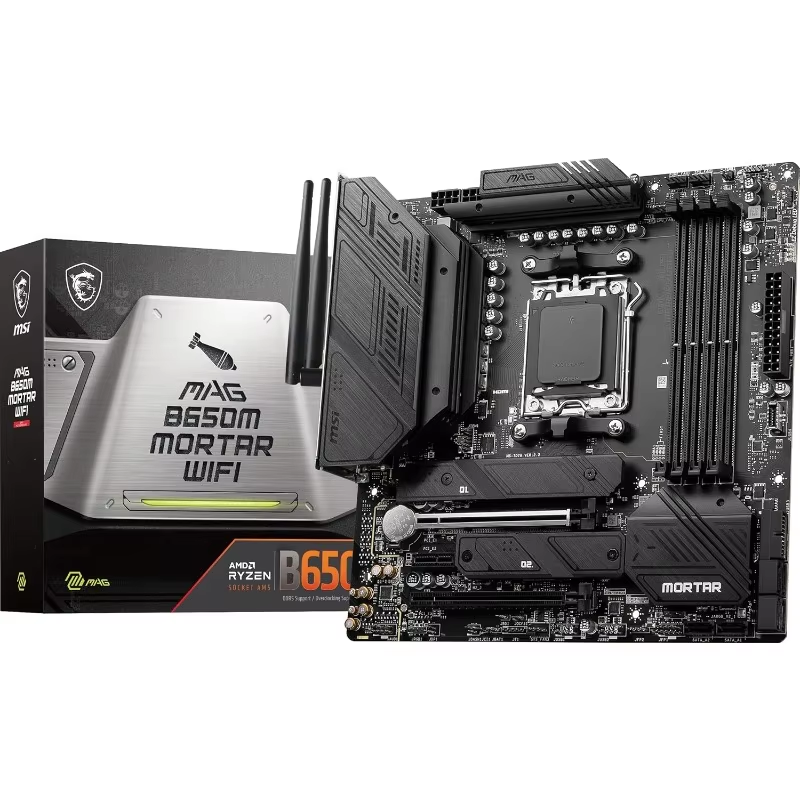
VRM Quality and Power Delivery: Ensuring Stable Multi-Core Performance
Why Robust VRMs Prevent Throttling During 4K/8K Timeline Rendering
Rendering 4K or 8K timelines pushes multi-core CPUs to their thermal and electrical limits—Intel’s Core i9-13900K, for instance, can draw up to 253W under sustained load. The motherboard’s voltage regulator module (VRM) must convert and deliver clean, stable power without ripple or sag. A weak or poorly designed VRM introduces voltage fluctuations that trigger CPU thermal or power throttling, often doubling render times. Robust VRMs minimize ripple and maintain tight voltage regulation—even during hour-long exports—ensuring consistent performance. While phase count matters (10+ phases is a practical baseline for high-end editing builds), it’s only one part of the equation: high-quality power stages, low-ESR capacitors, and intelligent PWM controllers are equally critical. Prioritize motherboards with documented VRM stability under 250W+ loads—not just headline phase numbers.
Thermal Design and Phase Count: Key Indicators of a Video Editing–Ready Motherboard
Phase count alone doesn’t guarantee reliability—what matters is how well each phase manages heat and current. Premium video-editing motherboards pair high-phase designs (e.g., 12+2+1) with substantial, finned metallic heatsinks over the VRM array. These heatsinks actively dissipate heat generated during prolonged rendering sessions, preventing thermal throttling and protecting MOSFET longevity. Since VRM efficiency directly impacts system-wide thermals—less wasted energy means less heat to manage—well-engineered regulators also reduce the cooling burden on your CPU and case airflow. For professional workstations, look for verified thermal test data: boards that maintain VRM temperatures below 90°C under sustained 250W+ CPU loads are proven ready for demanding, multi-hour editing workflows.
PCIe 5.0 and M.2 Architecture: Optimizing Storage Speed for Editing Workflows
Selecting a motherboard with forward-looking PCIe 5.0 and M.2 architecture is essential for editors handling 4K or 8K timelines. Modern PCIe 5.0 NVMe drives now exceed 14,500 MB/s sequential read speeds—but achieving those rates requires the primary M.2 slot to be wired directly to the CPU’s PCIe lanes. Chipset-connected slots (via DMI 4.0 x8) introduce bandwidth sharing and latency, especially when multiple high-speed drives are active. For proxy-free editing, this can manifest as stuttering during scrubbing or dropped frames during real-time playback. A CPU-direct PCIe 5.0 x4 slot guarantees full, dedicated bandwidth for your OS drive or active media volume, while chipset-linked slots remain suitable for scratch disks or archival storage.
PCIe 5.0 NVMe Slots vs. Shared Lanes: Avoiding Bottlenecks in Proxy-Free Editing
In proxy-free editing, storage throughput must be both high and predictable. A PCIe 5.0 NVMe drive in a CPU-attached slot sustains over 10,000 MB/s in real-world workloads—critical for loading massive RAW clips, multi-layer composites, or high-bitrate ProRes RAW timelines without delay. Mid-tier motherboards often route secondary M.2 slots through the chipset, creating a bottleneck: DMI 4.0 x8 offers only ~7.9 GB/s aggregate bandwidth shared across all chipset-connected devices—including SATA ports, USB controllers, and additional NVMe drives. Editors using separate SSDs for footage, cache, and renders benefit significantly from at least two CPU-direct M.2 slots, eliminating contention and ensuring every drive performs at its rated speed.
Thunderbolt 4/5 Integration and Chipset-Level Lane Allocation on Modern Motherboards
Thunderbolt 4 and emerging Thunderbolt 5 enable external NVMe storage speeds rivaling internal PCIe 4.0—making them ideal for portable ingest, field editing, or offloading media. However, Thunderbolt functionality depends entirely on proper PCIe lane allocation. On many Z790 and X670E motherboards, the Thunderbolt header shares PCIe lanes with a secondary M.2 slot or SATA controller. If enabled, this can disable a critical drive interface or throttle bandwidth. To preserve workflow flexibility, verify that your motherboard dedicates at least four PCIe 4.0 lanes exclusively to Thunderbolt—without sacrificing an M.2 slot or SATA port. Boards with flexible lane-switching BIOS options or discrete Thunderbolt controllers (e.g., Intel JHL8540) offer the most reliable integration for editors who rely on external storage without compromise.
DDR5 Memory Support: Capacity, Speed, and Stability for High-Resolution Editing
Video editing at 4K or 8K demands not just bandwidth—but memory capacity, rank configuration, and long-term stability. DDR5 delivers higher bandwidth than DDR4, but raw clock speed alone doesn’t translate to smoother editing. Latency, dual-rank interleaving, and platform compatibility matter more in practice—especially under sustained multi-threaded loads like timeline rendering or real-time effect processing.
64GB+ Dual-Rank DDR5 at 6000 MT/s: Why Memory Configuration Matters More Than Raw Speed
For high-resolution editing, memory configuration has a greater impact than peak frequency. Dual-rank DDR5 modules improve memory bus utilization by enabling better interleaving across ranks—reducing effective latency when applications access large datasets across multiple cores. A 64GB (2×32GB) dual-rank kit at 6000 MT/s consistently outperforms a faster but single-rank 32GB kit at 7200 MT/s: the larger capacity prevents out-of-memory stalls during complex timeline scrubbing or multi-track effects, while the dual-rank design maintains responsiveness under load. Crucially, 6000 MT/s represents the DDR5 stability sweet spot—achievable with tight timings (CL30–CL32) and minimal voltage tuning across most modern platforms. Higher speeds often require aggressive subtimings or increased VDDQ/VPP voltages, increasing instability risk during extended editing sessions. Always consult your motherboard’s QVL for verified dual-rank 64GB+ support at 6000 MT/s—this ensures compatibility, stability, and optimal JEDEC SPD profile behavior.
Chipset Selection and CPU Compatibility: Matching the Motherboard to Your Editing Stack
The motherboard’s chipset defines CPU compatibility, feature set, and long-term scalability—making it foundational to any professional editing build. Intel’s LGA1700 platform supports chipsets from entry-level H610 to enthusiast-grade Z790; AMD’s AM5 socket pairs with B650, X670, and X670E. For serious video editing, Z790 and X670E are strongly recommended: they unlock full CPU overclocking headroom (valuable for sustained render boosts), provide maximum PCIe 5.0 lane availability (critical for multi-NVMe and GPU configurations), and support higher DDR5 speeds with refined memory training. Lower-tier chipsets may physically accept the same CPU but often limit PCIe lane allocation, restrict memory overclocking, or cap NVMe drive support—potentially undermining performance in multi-drive, proxy-free workflows. Before purchasing, confirm chipset-specific features—especially PCIe lane routing, BIOS update requirements for newer CPUs, and official support for your target DDR5 configuration.
FAQ
What is a VRM and why is it important for video editing builds?
A VRM, or Voltage Regulator Module, ensures that your CPU receives clean and stable power during demanding tasks like rendering 4K/8K timelines. A robust VRM prevents throttling and doubles rendering efficiency.
How does phase count affect motherboard performance?
While a high phase count (e.g., 12+2+1) is important, the heat dissipation capability of each phase and quality of components like MOSFETs and heatsinks also influence performance.
Why is PCIe 5.0 essential for high-resolution video editing?
PCIe 5.0 optimizes storage speed for editors, with NVMe drives achieving faster sequential read rates necessary for scrubbing 4K/8K videos without lag.
What is the best memory configuration for editing 4K/8K video?
A 64GB dual-rank DDR5 kit at 6000 MT/s offers both high capacity and stability. It prevents out-of-memory stalls while enabling faster data access across multi-core workloads.
Which chipsets are recommended for professional video editing?
Intel Z790 and AMD X670E chipsets provide full CPU overclocking, PCIe 5.0 lane availability, and support higher DDR5 speeds ideal for demanding workflows.
Is Thunderbolt necessary for video editors?
Yes, Thunderbolt enables external storage speeds comparable to internal drives, supporting portable editing without bandwidth compromises.
Table of Contents
- VRM Quality and Power Delivery: Ensuring Stable Multi-Core Performance
- PCIe 5.0 and M.2 Architecture: Optimizing Storage Speed for Editing Workflows
- DDR5 Memory Support: Capacity, Speed, and Stability for High-Resolution Editing
- Chipset Selection and CPU Compatibility: Matching the Motherboard to Your Editing Stack
-
FAQ
- What is a VRM and why is it important for video editing builds?
- How does phase count affect motherboard performance?
- Why is PCIe 5.0 essential for high-resolution video editing?
- What is the best memory configuration for editing 4K/8K video?
- Which chipsets are recommended for professional video editing?
- Is Thunderbolt necessary for video editors?